

AI Agent – Information Retrieval in Odoo
Odoo's Information Retrieval AI Agent is designed to do exactly that. Rather than relying solely on the AI model's general...

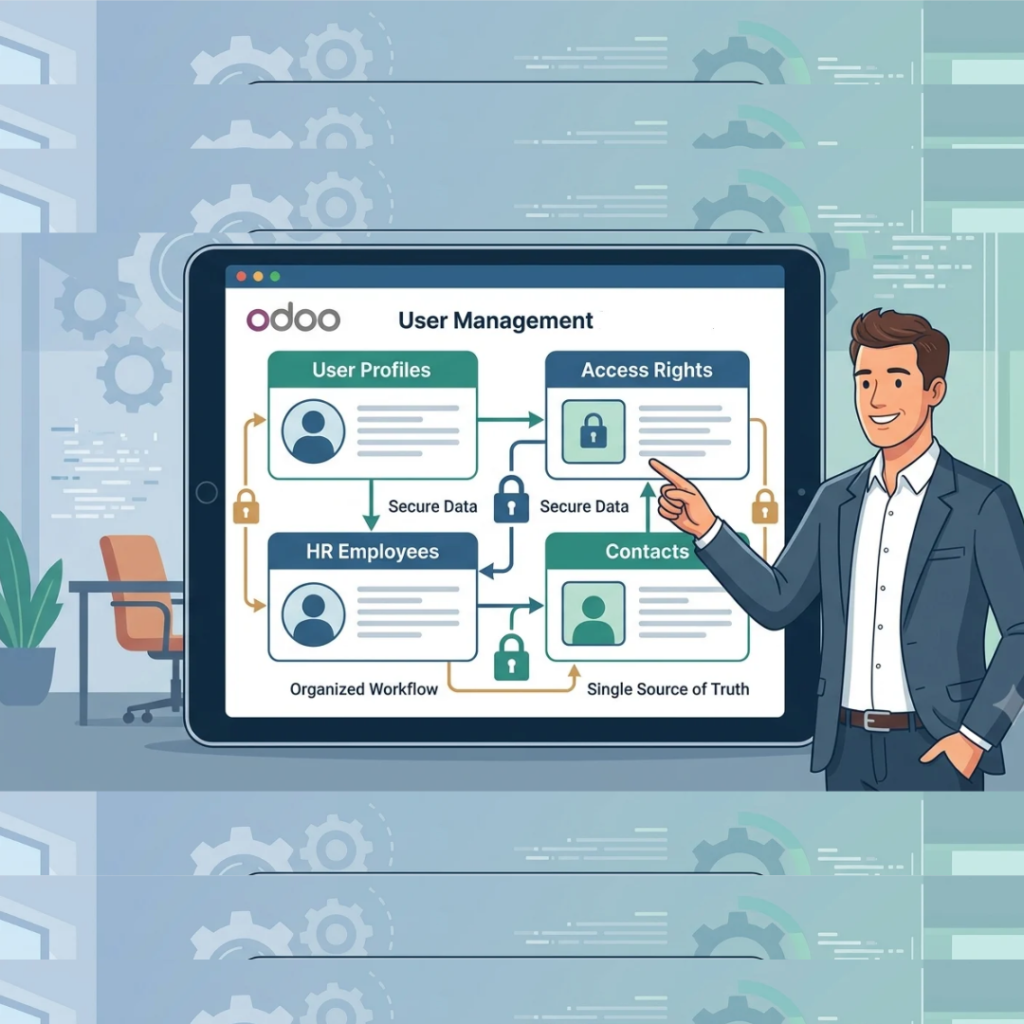
When you implement an ERP system for your business, two questions immediately become top priority for any business owner:
When companies set up Odoo ERP on their own without a clear structure, they almost always fall into a classic rookie trap. Whenever a new team member joins the company, someone creates a profile for them in the 𝗖𝗼𝗻𝘁𝗮𝗰𝘁𝘀 app, HR creates another profile in the 𝗘𝗺𝗽𝗹𝗼𝘆𝗲𝗲𝘀 app, and IT creates a third profile under 𝗨𝘀𝗲𝗿𝘀.
Before long, you have tripled your administrative work and created disconnected duplicate records across your database—leading to accounting errors, broken links, and confusion.
𝗧𝗵𝗲 𝗖𝗼𝗿𝗲 𝗖𝗼𝗻𝗰𝗲𝗽𝘁: 𝗢𝗻𝗲 𝗣𝗲𝗿𝘀𝗼𝗻, 𝗧𝗵𝗿𝗲𝗲 𝗗𝗶𝗳𝗳𝗲𝗿𝗲𝗻𝘁 "𝗛𝗮𝘁𝘀" 𝗶𝗻 𝗢𝗱𝗼𝗼
To keep your database spotless, it helps to understand why Odoo separates people into three distinct profile types. Depending on their relationship with your business, a single person can wear up to three “hats” in the system:
𝟭. 𝗧𝗵𝗲 𝗖𝗼𝗻𝘁𝗮𝗰𝘁 (𝗟𝗶𝘃𝗲𝘀 𝗶𝗻 𝘁𝗵𝗲 𝗖𝗼𝗻𝘁𝗮𝗰𝘁𝘀 𝗔𝗽𝗽)
Think of a 𝗖𝗼𝗻𝘁𝗮𝗰𝘁 as a digital business card holding a name, email address, phone number, and billing/shipping address. It is the basic identity required for commercial transactions like invoices, purchase orders, sales receipts, and delivery slips.
𝟮. 𝗧𝗵𝗲 𝗘𝗺𝗽𝗹𝗼𝘆𝗲𝗲 (𝗟𝗶𝘃𝗲𝘀 𝗶𝗻 𝘁𝗵𝗲 𝗘𝗺𝗽𝗹𝗼𝘆𝗲𝗲𝘀 𝗔𝗽𝗽)
An 𝗘𝗺𝗽𝗹𝗼𝘆𝗲𝗲 profile is strictly an internal Human Resources file. It has nothing to do with external customers or software login passwords. Instead, it tracks a person’s life inside your company: employment contracts, payroll and payslips, timesheets, attendance, and leave requests.
𝟯. 𝗧𝗵𝗲 𝗨𝘀𝗲𝗿 (𝗟𝗶𝘃𝗲𝘀 𝗶𝗻 𝗚𝗲𝗻𝗲𝗿𝗮𝗹 𝗦𝗲𝘁𝘁𝗶𝗻𝗴𝘀)
A 𝗨𝘀𝗲𝗿 is an active software login account. This is the only profile that possesses a 𝘂𝘀𝗲𝗿𝗻𝗮𝗺𝗲, 𝗽𝗮𝘀𝘀𝘄𝗼𝗿𝗱, 𝗮𝗻𝗱 𝘀𝗲𝗰𝘂𝗿𝗶𝘁𝘆 𝗮𝗰𝗰𝗲𝘀𝘀 𝗿𝗶𝗴𝗵𝘁𝘀 to log in and perform work inside your Odoo database.
An external customer is only a 𝗖𝗼𝗻𝘁𝗮𝗰𝘁. A factory floor worker might be a 𝗖𝗼𝗻𝘁𝗮𝗰𝘁 𝗮𝗻𝗱 𝗮𝗻 𝗘𝗺𝗽𝗹𝗼𝘆𝗲𝗲 (for payroll and leave tracking) without needing a paid 𝗨𝘀𝗲𝗿 login. And an office staff member will need 𝗮𝗹𝗹 𝘁𝗵𝗿𝗲𝗲 𝗽𝗿𝗼𝗳𝗶𝗹𝗲𝘀 linked together.
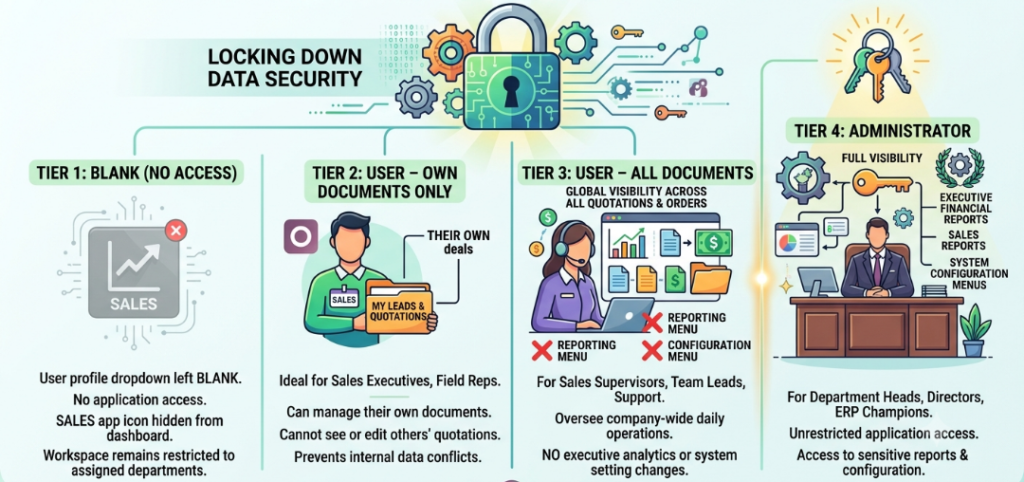
𝗟𝗼𝗰𝗸𝗶𝗻𝗴 𝗗𝗼𝘄𝗻 𝗗𝗮𝘁𝗮 𝗦𝗲𝗰𝘂𝗿𝗶𝘁𝘆: 𝗥𝗼𝗹𝗲-𝗕𝗮𝘀𝗲𝗱 𝗔𝗰𝗰𝗲𝘀𝘀 𝗥𝗶𝗴𝗵𝘁𝘀 𝗘𝘅𝗽𝗹𝗮𝗶𝗻𝗲𝗱
Once a staff member has a login, you shouldn’t give them the keys to the entire kingdom. A junior salesperson shouldn’t be able to see your company-wide profit margins, and a warehouse clerk shouldn’t be able to alter invoicing configurations.
At the same time, as a business owner, you don’t have time to configure permissions button-by-button for every employee.
Odoo solves this inside the 𝗔𝗰𝗰𝗲𝘀𝘀 𝗥𝗶𝗴𝗵𝘁𝘀 tab of each User profile using a clean, pre-configured hierarchy for every application installed in your database (Sales, Invoicing, Inventory, Manufacturing, etc.).
Let’s look at how Odoo’s four security tiers work in practice—using the 𝗦𝗮𝗹𝗲𝘀 𝗔𝗽𝗽 as an example
𝗧𝗶𝗲𝗿 𝟭: 𝗕𝗹𝗮𝗻𝗸 (𝗡𝗼 𝗔𝗰𝗰𝗲𝘀𝘀)
If you leave an application’s dropdown field blank, the user has 𝘇𝗲𝗿𝗼 𝗮𝗰𝗰𝗲𝘀𝘀 to that department. When they log into Odoo, that application icon doesn’t even appear on their home dashboard. Their workspace stays clean, distraction-free, and restricted to their department.
𝗧𝗶𝗲𝗿 𝟮: 𝗨𝘀𝗲𝗿 — 𝗢𝘄𝗻 𝗗𝗼𝗰𝘂𝗺𝗲𝗻𝘁𝘀 𝗢𝗻𝗹𝘆
This is the gold standard for individual sales executives or field representatives. With this setting, the salesperson can open the Sales app, manage their own leads, and create their own quotations—𝗯𝘂𝘁 𝘁𝗵𝗲𝘆 𝗰𝗮𝗻𝗻𝗼𝘁 𝘀𝗲𝗲 𝗼𝗿 𝘁𝗼𝘂𝗰𝗵 𝗾𝘂𝗼𝘁𝗮𝘁𝗶𝗼𝗻𝘀 𝗯𝗲𝗹𝗼𝗻𝗴𝗶𝗻𝗴 𝘁𝗼 𝗼𝘁𝗵𝗲𝗿 𝘀𝗮𝗹𝗲𝘀𝗽𝗲𝗼𝗽𝗹𝗲. Your client list stays protected from internal poaching or accidental edits.
𝗧𝗶𝗲𝗿 𝟯: 𝗨𝘀𝗲𝗿 — 𝗔𝗹𝗹 𝗗𝗼𝗰𝘂𝗺𝗲𝗻𝘁𝘀
Designed for Sales Supervisors, Team Leads, or Customer Support coordinators. This role grants global visibility across all quotations and sales orders in the company so managers can oversee daily operations. Crucially, however, Odoo still hides the 𝗥𝗲𝗽𝗼𝗿𝘁𝗶𝗻𝗴 𝗺𝗲𝗻𝘂 𝗮𝗻𝗱 𝘁𝗵𝗲 𝗖𝗼𝗻𝗳𝗶𝗴𝘂𝗿𝗮𝘁𝗶𝗼𝗻 𝗺𝗲𝗻𝘂—meaning they can manage day-to-day deals without viewing sensitive executive analytics or changing system settings.
𝗧𝗶𝗲𝗿 𝟰: 𝗔𝗱𝗺𝗶𝗻𝗶𝘀𝘁𝗿𝗮𝘁𝗼𝗿
Reserved for Department Heads, Directors, or ERP Champions. An Administrator has full visibility over the application, including executive 𝗙𝗶𝗻𝗮𝗻𝗰𝗶𝗮𝗹 & 𝗦𝗮𝗹𝗲𝘀 𝗥𝗲𝗽𝗼𝗿𝘁𝘀 and system 𝗖𝗼𝗻𝗳𝗶𝗴𝘂𝗿𝗮𝘁𝗶𝗼𝗻 menus.
𝗕𝘂𝗶𝗹𝗱 𝗮 𝗦𝗲𝗰𝘂𝗿𝗲, 𝗦𝗰𝗮𝗹𝗮𝗯𝗹𝗲 𝗘𝗥𝗣 𝗙𝗼𝘂𝗻𝗱𝗮𝘁𝗶𝗼𝗻 𝗳𝗼𝗿 𝗬𝗼𝘂𝗿 𝗕𝘂𝘀𝗶𝗻𝗲𝘀𝘀
A well-configured ERP does more than automate tasks—it enforces governance across your organization. When your 𝗖𝗼𝗻𝘁𝗮𝗰𝘁𝘀, 𝗘𝗺𝗽𝗹𝗼𝘆𝗲𝗲𝘀, 𝗮𝗻𝗱 𝗨𝘀𝗲𝗿𝘀 are properly structured and your 𝗔𝗰𝗰𝗲𝘀𝘀 𝗥𝗶𝗴𝗵𝘁𝘀 mirror your real-world organizational chart, your team works faster, your master data remains accurate, and your sensitive business information stays strictly confidential.
Odoo's Information Retrieval AI Agent is designed to do exactly that. Rather than relying solely on the AI model's general...
Landed cost refers to the total cost of acquiring a product from a vendor and getting it delivered to its...
why Odoo separates people into three distinct profile types. Depending on their relationship with your business, a single person can...
Let’s bring your vision to life! Get in touch with us today.
+91 871 483 1222