

AI Agent – Information Retrieval in Odoo
Odoo's Information Retrieval AI Agent is designed to do exactly that. Rather than relying solely on the AI model's general...

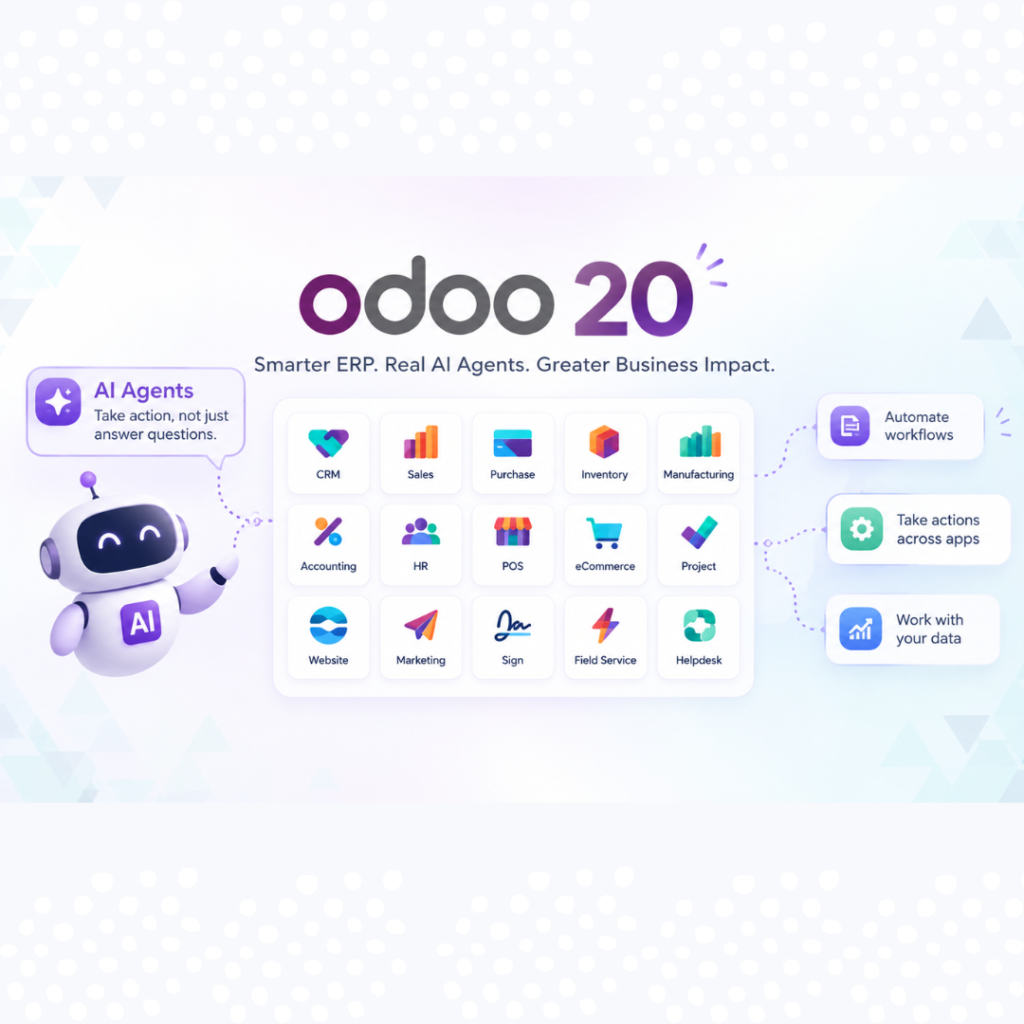
Odoo 20 is the latest major version of the Odoo ERP platform. Like earlier versions, it brings CRM, Sales, Purchase, Inventory, Manufacturing, Accounting, HR, POS, eCommerce, Project and more into one integrated system.
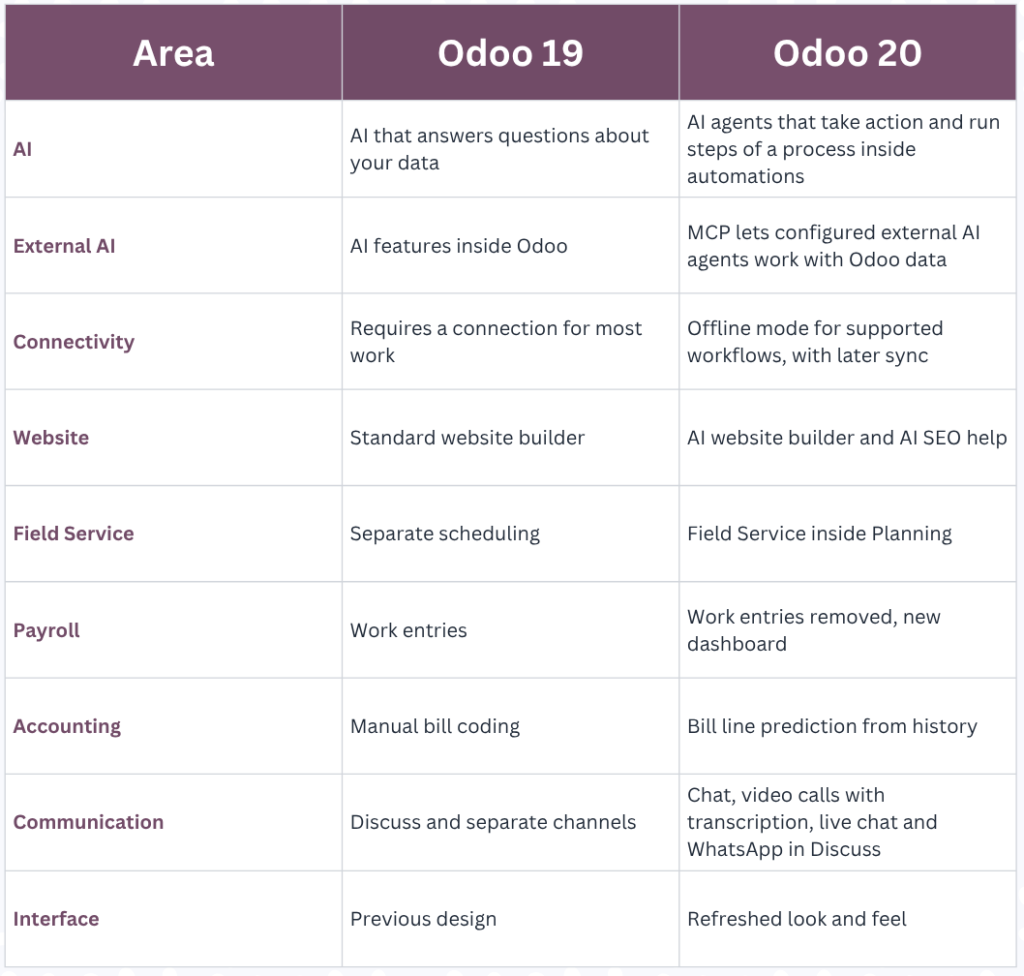
What sets this release apart is how deeply AI and automation now sit inside everyday workflows. Odoo 19 introduced AI that could answer questions about your data. Odoo 20 extends that into agents that can take action and run parts of a process, within the permissions and rules you define.
𝗔𝗜 𝗔𝗴𝗲𝗻𝘁𝘀 𝗶𝗻 𝗢𝗱𝗼𝗼 𝟮𝟬: 𝗙𝗿𝗼𝗺 𝗔𝗻𝘀𝘄𝗲𝗿𝘀 𝘁𝗼 𝗔𝗰𝘁𝗶𝗼𝗻𝘀
In Odoo 20, AI can be used inside automations. Using natural-language instructions, businesses can set up processes such as confirming sales orders, assigning leads, creating a project once a contract is signed, or notifying the right user when stock runs low.
𝗧𝗿𝗮𝗱𝗶𝘁𝗶𝗼𝗻𝗮𝗹 𝘄𝗼𝗿𝗸𝗳𝗹𝗼𝘄: Lead received → employee reviews it → employee assigns it → employee follows up.
𝗔𝗜-𝗮𝘀𝘀𝗶𝘀𝘁𝗲𝗱 𝘄𝗼𝗿𝗸𝗳𝗹𝗼𝘄: Lead received → AI evaluates context → lead assigned → follow-up triggered.
The aim is not to remove people from the process. It is to remove repetitive administration so your team can spend time on decisions that need human judgment. Because AI runs inside defined automations and user permissions, you stay in control of what it can and cannot do.
Everyday AI assistance also covers drafting and improving emails, product descriptions, notes and knowledge articles, so teams start from a draft instead of a blank page.
𝗢𝗱𝗼𝗼 𝗠𝗖𝗣: 𝗖𝗼𝗻𝗻𝗲𝗰𝘁𝗶𝗻𝗴 𝗘𝘅𝘁𝗲𝗿𝗻𝗮𝗹 𝗔𝗜 𝗔𝗴𝗲𝗻𝘁𝘀 𝘁𝗼 𝗬𝗼𝘂𝗿 𝗘𝗥𝗣
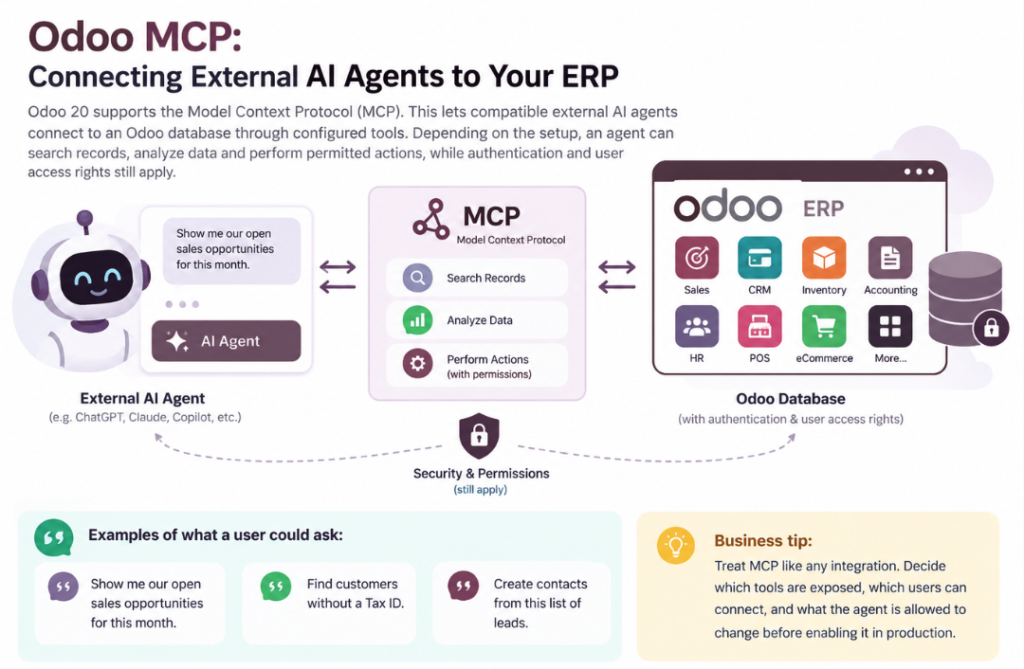
Odoo 20 supports the 𝗠𝗼𝗱𝗲𝗹 𝗖𝗼𝗻𝘁𝗲𝘅𝘁 𝗣𝗿𝗼𝘁𝗼𝗰𝗼𝗹 (𝗠𝗖𝗣). This lets compatible external AI agents connect to an Odoo database through configured tools. Depending on the setup, an agent can search records, analyze data and perform permitted actions, while authentication and user access rights still apply.
Examples of what a user could ask an MCP-connected AI client:
𝗕𝘂𝘀𝗶𝗻𝗲𝘀𝘀 𝘁𝗶𝗽: treat MCP like any integration. Decide which tools are exposed, which users can connect, and what the agent is allowed to change before enabling it in production.
𝗢𝗳𝗳𝗹𝗶𝗻𝗲 𝗠𝗼𝗱𝗲: 𝗞𝗲𝗲𝗽 𝗪𝗼𝗿𝗸𝗶𝗻𝗴 𝗪𝗵𝗲𝗻 𝘁𝗵𝗲 𝗖𝗼𝗻𝗻𝗲𝗰𝘁𝗶𝗼𝗻 𝗗𝗿𝗼𝗽𝘀
Odoo 20 adds an offline mode. Supported records and views that were already loaded stay available without a connection, certain operations can be performed offline, and changes are queued and synchronized when connectivity returns. Availability depends on what was previously accessed and which screens support offline use, so test your own workflows.
This is most relevant for warehouses, field service teams, retail locations and remote or mobile staff.
𝗢𝗱𝗼𝗼 𝟮𝟬 𝗙𝗲𝗮𝘁𝘂𝗿𝗲𝘀 𝗯𝘆 𝗗𝗲𝗽𝗮𝗿𝘁𝗺𝗲𝗻𝘁
Website, SEO and eCommerce
Odoo 20 introduces an AI website builder: you describe the page you want, and the AI builds it, including promotions, events and product pages. AI also helps with copy changes, translation and SEO optimization of individual pages from a reorganized editor.
Sales and CRM
Lead generation expands with access to Odoo’s directory of more than 580 million entities, plus options such as website visitor detection, Outlook or Gmail connections and scanned business cards. Combined with AI-assisted automation, lead assignment, follow-ups and pipeline updates can be standardized and largely automated.
Inventory and Purchase
Replenishment strategies such as Make to Order continue to link sales confirmation to purchase or manufacturing needs. Allocation tools help you decide which customer orders incoming stock should fulfil. That shifts the question from “how much stock do we have?” to “which orders should this stock serve?”
Manufacturing
Production planning gets more flexible, including a Kanban view where work can be dragged between work centers and priorities adjusted, with status and color indicators showing what is late. This keeps the chain from sales order to material requirement, production, inventory and delivery connected in one system.
Field Service and Planning
Field Service moves into Planning, so technician scheduling sits alongside the rest of your resource planning. Interventions can be scheduled by drag and drop, with travel time accounted for automatically. Connect customer request, planning, technician, materials, timesheet and billing in a single flow.
Accounting
Odoo 20 adds bill line prediction, suggesting product, account, tax and analytic distribution based on bill history and label, and makes direct bill payments easier. The benefit is less manual coding and faster access to reliable financial data from live transactions.
HR and Payroll
Payroll becomes leaner: work entries are removed and a new payroll dashboard is introduced. Check this carefully if you run customized payroll rules, because it changes how existing setups behave.
Point of Sale and Retail
POS stays integrated with inventory, customers and accounting, so a sale at any branch updates stock, customer records, accounting and reporting without re-entry. POS presets let you apply different settings to order types such as dine-in, takeaway and delivery.
Communication, Documents and Sign
Discuss brings chat, channels, video calls, AI, live chat and WhatsApp into one place, with browser-based video calls and automatic transcription. Documents gets easier access management, Sign supports more automated workflows, and emails sent from Odoo can now include CC recipients.
Interface
Odoo 20 refreshes the look and feel, with a cleaner layout and more consistent icons, tags and status displays.
𝗢𝗱𝗼𝗼 𝟭𝟵 𝘃𝘀 𝗢𝗱𝗼𝗼 𝟮𝟬: 𝗪𝗵𝗮𝘁 𝗖𝗵𝗮𝗻𝗴𝗲𝗱?
𝗢𝗱𝗼𝗼 𝗼𝗹𝗱𝗲𝗿 𝘃𝗲𝗿𝘀𝗶𝗼𝗻 𝘁𝗼 𝗢𝗱𝗼𝗼𝟮𝟬 𝗠𝗶𝗴𝗿𝗮𝘁𝗶𝗼𝗻 𝗖𝗵𝗲𝗰𝗸𝗹𝗶𝘀𝘁
Upgrading a customized database in older version is not just installing a new version. A structured migration should include:
Take extra care with payroll customizations, Field Service setups and anything built on Studio or custom automated actions.
𝗦𝗵𝗼𝘂𝗹𝗱 𝗬𝗼𝘂𝗿 𝗕𝘂𝘀𝗶𝗻𝗲𝘀𝘀 𝗨𝗽𝗴𝗿𝗮𝗱𝗲 𝘁𝗼 𝗢𝗱𝗼𝗼 𝟮𝟬?
Odoo 20 is worth evaluating if your business:
If your existing older version of Odoo is heavily customized, start with an assessment. A version upgrade is a chance to review your ERP architecture, not just carry old customizations forward.
🅵🅰🆀
𝗪𝗵𝗮𝘁 𝗶𝘀 𝗢𝗱𝗼𝗼 𝟮𝟬?
Odoo 20 is the latest major version of the Odoo ERP platform, released on September 24, 2026. It focuses on AI agents, automation, a refreshed interface and tighter integration between apps.
𝗪𝗵𝗮𝘁 𝗮𝗿𝗲 𝘁𝗵𝗲 𝗺𝗮𝗶𝗻 𝗻𝗲𝘄 𝗳𝗲𝗮𝘁𝘂𝗿𝗲𝘀 𝗶𝗻 𝗢𝗱𝗼𝗼 𝟮𝟬?
Key additions include AI agents in automations, MCP connectivity, offline mode, an AI website builder, Field Service in Planning, payroll simplifications, bill line prediction and an improved Discuss.
𝗪𝗵𝗮𝘁 𝗶𝘀 𝗠𝗖𝗣 𝗶𝗻 𝗢𝗱𝗼𝗼 𝟮𝟬?
MCP (Model Context Protocol) lets compatible external AI agents connect to an Odoo database through configured tools. Authentication and user permissions still apply.
𝗖𝗮𝗻 𝗔𝗜 𝗮𝗴𝗲𝗻𝘁𝘀 𝗽𝗲𝗿𝗳𝗼𝗿𝗺 𝗮𝗰𝘁𝗶𝗼𝗻𝘀 𝗶𝗻 𝗢𝗱𝗼𝗼 𝟮𝟬?
Yes, within controlled workflows and permissions you configure. AI can support automated processes and, through MCP tools, interact with Odoo data.
𝗗𝗼𝗲𝘀 𝗢𝗱𝗼𝗼 𝟮𝟬 𝘄𝗼𝗿𝗸 𝗼𝗳𝗳𝗹𝗶𝗻𝗲?
Odoo 20 adds an offline mode for supported workflows. Previously loaded data stays available and changes sync when the connection returns.
𝗦𝗵𝗼𝘂𝗹𝗱 𝗜 𝘂𝗽𝗴𝗿𝗮𝗱𝗲 𝗳𝗿𝗼𝗺 𝗢𝗱𝗼𝗼 𝟭𝟵 𝘁𝗼 𝗢𝗱𝗼𝗼 𝟮𝟬?
It depends on your customizations, integrations and the value of the new features to you. A technical and functional assessment is recommended before upgrading a customized database.
𝗖𝗮𝗻 𝗮 𝗰𝘂𝘀𝘁𝗼𝗺𝗶𝘇𝗲𝗱 𝗢𝗱𝗼𝗼 𝟭𝟵 𝗱𝗮𝘁𝗮𝗯𝗮𝘀𝗲 𝗯𝗲 𝗺𝗶𝗴𝗿𝗮𝘁𝗲𝗱 𝘁𝗼 𝗢𝗱𝗼𝗼 𝟮𝟬?
Yes, with proper planning. Custom modules, integrations, automated actions and security rules should be reviewed and tested on a staging copy before production migration.
𝗪𝗵𝘆 𝘄𝗼𝗿𝗸 𝘄𝗶𝘁𝗵 𝗮𝗻 𝗢𝗱𝗼𝗼 𝗶𝗺𝗽𝗹𝗲𝗺𝗲𝗻𝘁𝗮𝘁𝗶𝗼𝗻 𝗽𝗮𝗿𝘁𝗻𝗲𝗿?
A partner helps translate business processes into ERP workflows, spot automation opportunities, manage customizations and integrations, and reduce risk during implementation or migration.
𝗙𝗶𝗻𝗮𝗹 𝗧𝗵𝗼𝘂𝗴𝗵𝘁𝘀
Odoo 20 moves ERP from recording transactions toward helping employees understand data, automate processes and act on decisions. The technology matters, but the value comes from building the right workflows around how your organization operates.
Odoo's Information Retrieval AI Agent is designed to do exactly that. Rather than relying solely on the AI model's general...
Landed cost refers to the total cost of acquiring a product from a vendor and getting it delivered to its...
why Odoo separates people into three distinct profile types. Depending on their relationship with your business, a single person can...
Let’s bring your vision to life! Get in touch with us today.
+91 871 483 1222