

AI Agent – Information Retrieval in Odoo
Odoo's Information Retrieval AI Agent is designed to do exactly that. Rather than relying solely on the AI model's general...

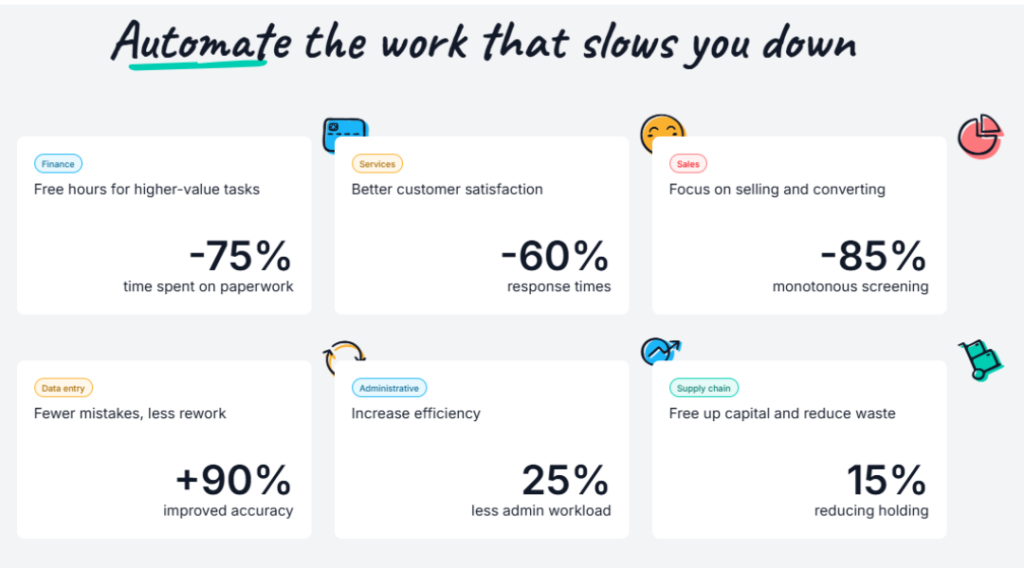
Businesses today spend countless hours on repetitive tasks, manual data entry, document processing, and responding to customer inquiries. Odoo 19 addresses these challenges by embedding Artificial Intelligence (AI) throughout its ERP platform, enabling organizations to automate routine operations, improve decision-making, and increase employee productivity without changing the way they work.
If you’re planning to upgrade/implement ERP, Odoo 19 introduces a new generation of AI-powered capabilities that make everyday business processes smarter and more efficient. From drafting emails and summarizing documents to generating reports, answering questions, and automating workflows, Artificial Intelligence in Odoo 19 provides context-aware assistance across multiple business applications. By combining intelligent automation with a familiar user experience, Odoo 19 helps organizations reduce manual effort, improve accuracy, and make faster, data-driven decision.
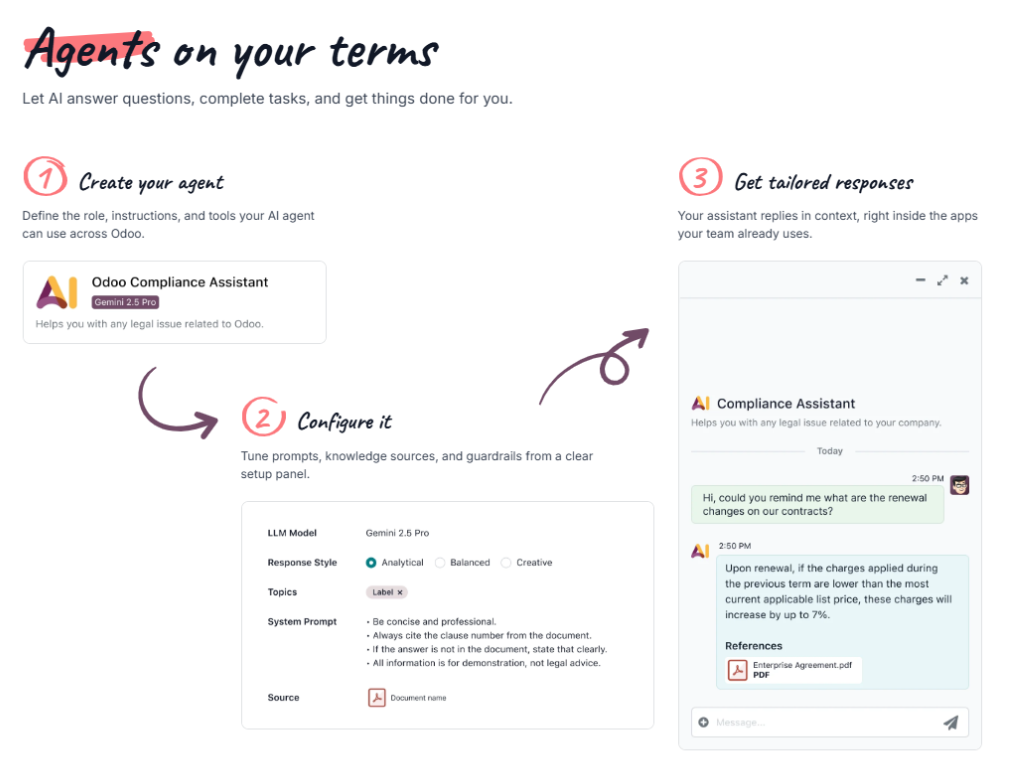
𝗠𝗲𝗲𝘁 𝗬𝗼𝘂𝗿 𝗡𝗲𝘄 𝗦𝗺𝗮𝗿𝘁 𝗔𝘀𝘀𝗶𝘀𝘁𝗮𝗻𝘁: 𝗔𝗜 𝗔𝗴𝗲𝗻𝘁𝘀
At the core of the AI structure in Odoo are AI agents. An AI agent is a smart assistant in Odoo that can understand natural language, perform tasks, and assist users by interacting with Odoo tools. These agents are formed of two main components: Topics (which dictate the instructions and roles for tasks) and Sources (the indexed data, such as PDFs or Knowledge articles, that the agent refers to when generating responses).
Through the Ask AI feature, users can receive assistance anywhere in an Odoo database. It understands natural language and can answer questions, open views, and improve content. Whether you need to translate the most recent chatter message, generate a follow-up message, or suggest next steps for a sales rep, Ask AI is ready to execute.
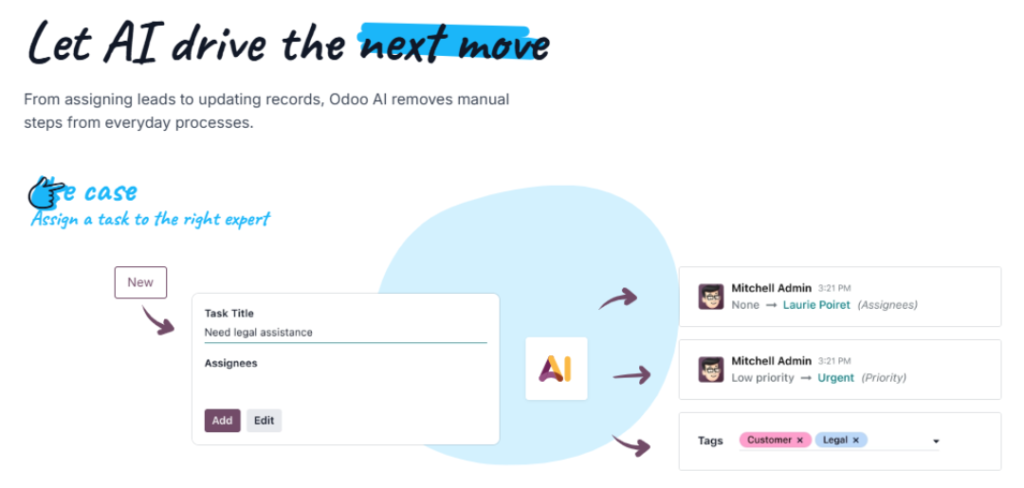
𝗔𝘂𝘁𝗼𝗺𝗮𝘁𝗲 𝗥𝗲𝗽𝗲𝘁𝗶𝘁𝗶𝘃𝗲 𝗪𝗼𝗿𝗸: 𝗗𝗼𝗰𝘂𝗺𝗲𝗻𝘁𝘀 𝗮𝗻𝗱 𝗦𝗲𝗿𝘃𝗲𝗿 𝗔𝗰𝘁𝗶𝗼𝗻𝘀
For high-volume, repetitive document workflows where speed, accuracy, and traceability are critical, 𝗢𝗱𝗼𝗼 𝗔𝗜 𝗗𝗼𝗰𝘂𝗺𝗲𝗻𝘁 𝗔𝘂𝘁𝗼𝗺𝗮𝘁𝗶𝗼𝗻 is an absolute necessity. It enables automated classification, routing, and processing of documents using artificial intelligence. It reduces manual handling of documents such as invoices, contracts, NDAs, and insurance files by automatically sorting them into folders, extracting key information, and triggering business actions.
Taking automation a step further, AI server actions extend Odoo’s automation framework by allowing artificial intelligence to make decisions during a workflow. They are designed for cases where logic cannot be expressed entirely through fixed conditions, but still requires controlled execution. The AI server action acts as a decision-maker—or a manager—deciding which tool to call, while the tool itself contains all execution logic and performs the record updates.
𝗡𝗲𝘅𝘁-𝗟𝗲𝘃𝗲𝗹 𝗣𝗿𝗼𝗱𝘂𝗰𝘁𝗶𝘃𝗶𝘁𝘆 𝘄𝗶𝘁𝗵 𝗔𝗜: 𝑽𝒐𝒊𝒄𝒆 𝑻𝒓𝒂𝒏𝒔𝒄𝒓𝒊𝒑𝒕𝒊𝒐𝒏, 𝑺𝒎𝒂𝒓𝒕 𝑭𝒊𝒆𝒍𝒅𝒔 & 𝑰𝒏𝒕𝒆𝒍𝒍𝒊𝒈𝒆𝒏𝒕 𝑫𝒐𝒄𝒖𝒎𝒆𝒏𝒕 𝑴𝒂𝒏𝒂𝒈𝒆𝒎𝒆𝒏𝒕
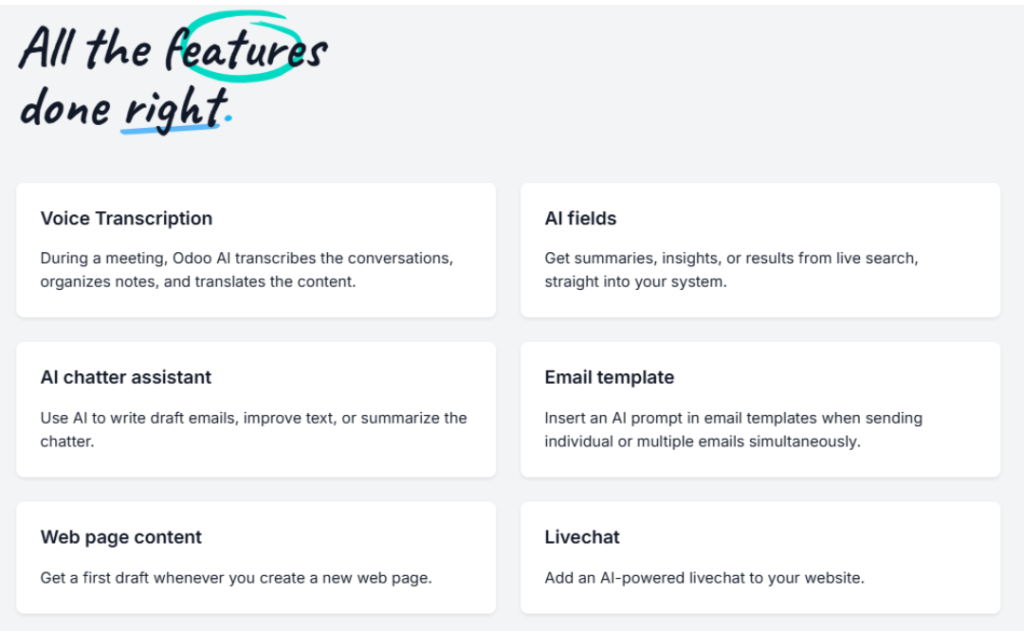
Tired of taking manual notes during crucial meetings? Odoo AI can transcribe spoken audio into text and generate summaries from that transcript. This feature supports both meeting recordings and real-time dictation, making it easier to capture notes, decisions, and action items without manual typing. Once the transcription process is complete, the audio recording is automatically discarded to ensure data privacy.
Additionally, AI fields allow users to utilize Odoo’s built-in AI capabilities directly in forms and records. When an AI field is configured, the system can generate or suggest values automatically based on the record’s context, existing data, or external information. This is especially useful for creating product descriptions, summarizing notes, or generating structured content from unstructured data.
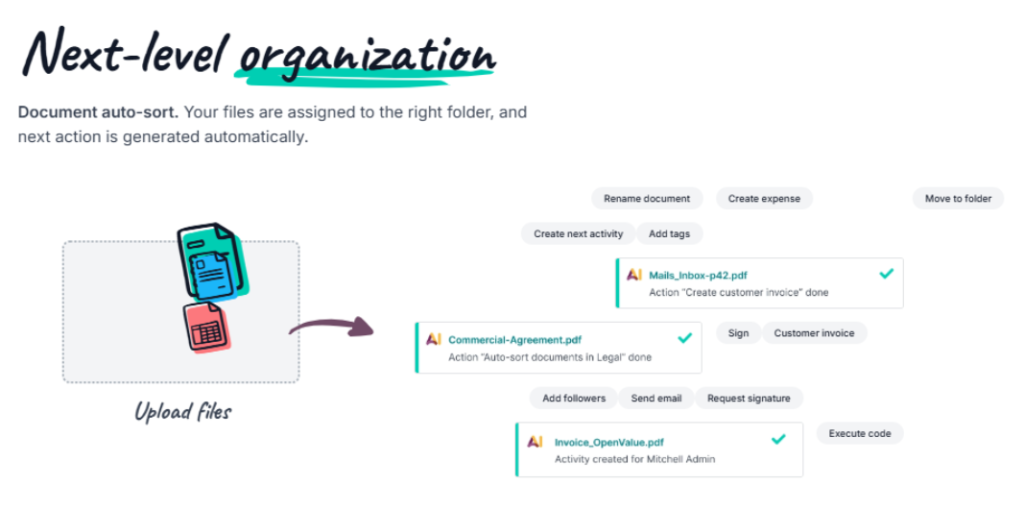
Beyond voice transcription and AI-powered fields, Odoo 19 also brings intelligent document management to everyday business operations. As shown in the illustration below, users can simply upload files, and Odoo AI automatically analyzes their content to classify and organize them into the appropriate folders. Based on the document type and business context, the system can trigger the next action automatically, such as creating follow-up activities, requesting electronic signatures, generating customer invoices, creating expense records, adding relevant tags, sending emails, or assigning documents to the correct department. This AI-driven document workflow minimizes manual intervention, improves document accuracy, and ensures that critical business processes continue without delays.
𝗜𝗻𝘀𝘁𝗮𝗻𝘁 𝗕𝘂𝘀𝗶𝗻𝗲𝘀𝘀 𝗜𝗻𝘀𝗶𝗴𝗵𝘁𝘀 𝘄𝗶𝘁𝗵 𝗔𝗜: 𝑺𝒎𝒂𝒓𝒕𝒆𝒓 𝑨𝒏𝒂𝒍𝒚𝒕𝒊𝒄𝒔 𝒂𝒏𝒅 𝑭𝒂𝒔𝒕𝒆𝒓 𝑪𝒖𝒔𝒕𝒐𝒎𝒆𝒓 𝑺𝒖𝒑𝒑𝒐𝒓𝒕
Providing exceptional customer service requires quick access to information and efficient ticket management. Odoo 19 AI enhances the Helpdesk application by assisting support teams with intelligent automation rather than replacing existing workflows. Instead of manually categorizing, prioritizing, and responding to every request, AI interprets incoming customer messages, performs preliminary processing, and helps agents resolve issues more efficiently.
Automation rules enable AI to take action whenever support tickets are created or updated, while AI-powered fields transform lengthy customer messages into concise summaries and structured information. This allows support agents to quickly understand customer concerns, prioritize requests effectively, and deliver faster, more accurate responses without spending valuable time reviewing lengthy conversations.
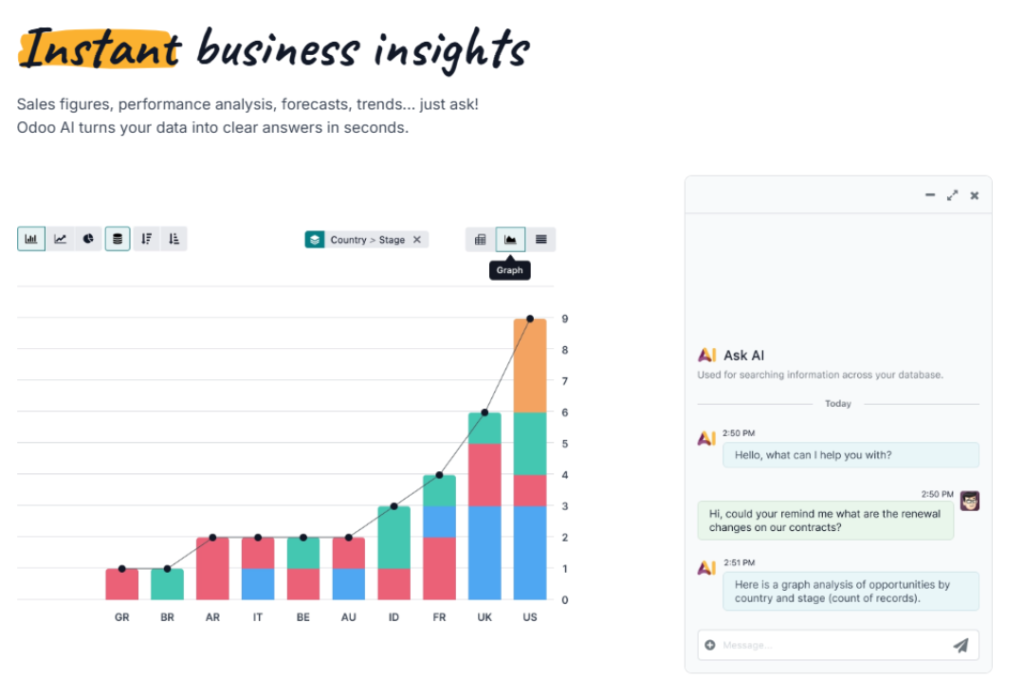
Beyond customer support, 𝗢𝗱𝗼𝗼 𝟭𝟵 𝗔𝗜 𝗲𝗻𝗮𝗯𝗹𝗲𝘀 𝘂𝘀𝗲𝗿𝘀 𝘁𝗼 𝗴𝗮𝗶𝗻 𝗶𝗻𝘀𝘁𝗮𝗻𝘁 𝗯𝘂𝘀𝗶𝗻𝗲𝘀𝘀 𝗶𝗻𝘀𝗶𝗴𝗵𝘁𝘀 through natural language interactions. As illustrated below, users can simply ask questions such as sales performance, revenue trends, opportunity analysis, contract renewals, or pipeline forecasts, and Odoo AI retrieves relevant information directly from the ERP database. Instead of manually creating reports or dashboards, the system automatically generates charts, graphs, and analytical summaries within seconds. This conversational approach to business intelligence empowers managers and decision-makers to access real-time insights, monitor key performance indicators (KPIs), and make faster, data-driven decisions without requiring advanced reporting expertise.
𝗖𝗼𝗻𝗰𝗹𝘂𝘀𝗶𝗼𝗻: 𝗘𝗺𝗯𝗿𝗮𝗰𝗲 𝘁𝗵𝗲 𝗙𝘂𝘁𝘂𝗿𝗲 𝘄𝗶𝘁𝗵 𝗢𝗱𝗼𝗼 𝟭𝟵 𝗔𝗜
𝗔𝗿𝘁𝗶𝗳𝗶𝗰𝗶𝗮𝗹 𝗜𝗻𝘁𝗲𝗹𝗹𝗶𝗴𝗲𝗻𝗰𝗲 𝗶𝗻 𝗢𝗱𝗼𝗼 𝟭𝟵 𝗶𝘀 𝗳𝗮𝗿 𝗺𝗼𝗿𝗲 𝘁𝗵𝗮𝗻 𝗷𝘂𝘀𝘁 𝗮 𝗰𝗵𝗮𝘁𝗯𝗼𝘁 — it is a comprehensive AI ERP software solution that transforms the way businesses operate. By embedding artificial intelligence into ERP processes, Odoo 19 empowers users across Sales, Accounting, HR, Customer Support, Document Management, Inventory, Manufacturing, and other business functions with intelligent, context-aware assistance. From automating repetitive tasks and generating meaningful insights to improving decision-making and enhancing operational efficiency, Odoo’s AI capabilities help organizations work smarter, reduce manual effort, improve accuracy, and accelerate business growth. As businesses continue to embrace digital transformation, implementing an AI-powered ERP like Odoo 19 provides a significant competitive advantage through increased productivity, intelligent automation, and streamlined business operations.
Whether you are planning to upgrade to Odoo 19 or implement a new AI-powered ERP solution, proper planning, module configuration, testing, and user adoption are essential to unlocking the full potential of these intelligent features. At Abblez Technologies, we help businesses implement, customize, and optimize Odoo 19 to align with their unique operational requirements. Our team can assist you in configuring AI-powered workflows, automating business processes, and ensuring a smooth migration, enabling your organization to maximize the benefits of Artificial Intelligence in ERP.
Odoo's Information Retrieval AI Agent is designed to do exactly that. Rather than relying solely on the AI model's general...
Landed cost refers to the total cost of acquiring a product from a vendor and getting it delivered to its...
why Odoo separates people into three distinct profile types. Depending on their relationship with your business, a single person can...
Let’s bring your vision to life! Get in touch with us today.
+91 871 483 1222