

Boosting Retail & Wholesale Sales with Business Promotions in Odoo
As Odoo continues to evolve, version 18 is anticipated to introduce a range of innovative features designed to enhance user...


Managing inventory from Head Office (HO) to multiple franchise / branches is one of the biggest operational challenges in retail. Bulk purchases, variant-heavy products, stock transfers, and branch-level disputes can quickly turn growth into chaos.
If your retail franchise is still relying on legacy systems / Excel for purchase tracking, serial management, and stock transfers, inventory errors are not accidental — they are systemic.
This is where a structured 𝗢𝗱𝗼𝗼 𝗙𝗿𝗮𝗻𝗰𝗵𝗶𝘀𝗲 𝗜𝗻𝘃𝗲𝗻𝘁𝗼𝗿𝘆 𝗠𝗮𝗻𝗮𝗴𝗲𝗺𝗲𝗻𝘁 𝘀𝘆𝘀𝘁𝗲𝗺 transforms operations.
𝗪𝗵𝘆 𝗜𝗻𝘃𝗲𝗻𝘁𝗼𝗿𝘆 𝗖𝗵𝗮𝗼𝘀 𝗛𝗮𝗽𝗽𝗲𝗻𝘀 𝗶𝗻 𝗥𝗲𝘁𝗮𝗶𝗹 𝗙𝗿𝗮𝗻𝗰𝗵𝗶𝘀𝗲 𝗕𝘂𝘀𝗶𝗻𝗲𝘀𝘀𝗲𝘀?
As franchise networks expand, common inventory problems multiply:
Legacy systems with the support of excel cannot handle serial tracking, multi-attribute products, or real-time inter-branch visibility. The result? Miscounts, delayed reconciliation, and profit leakage.
𝗙𝗶𝘅𝗶𝗻𝗴 𝗛𝗢 𝘁𝗼 𝗕𝗿𝗮𝗻𝗰𝗵 𝗜𝗻𝘃𝗲𝗻𝘁𝗼𝗿𝘆 𝗙𝗹𝗼𝘄 𝗨𝘀𝗶𝗻𝗴 𝗢𝗱𝗼𝗼 𝗘𝗥𝗣
A retail franchise requires a structured, scan-based inventory flow — not spreadsheets.
Here is the optimized process we implement:
1. 𝗦𝘁𝗿𝘂𝗰𝘁𝘂𝗿𝗲𝗱 𝗣𝘂𝗿𝗰𝗵𝗮𝘀𝗲 𝗢𝗿𝗱𝗲𝗿 𝗖𝗿𝗲𝗮𝘁𝗶𝗼𝗻 𝗮𝘁 𝗛𝗲𝗮𝗱 𝗢𝗳𝗳𝗶𝗰𝗲
Bulk buying for apparel requires strict product control.
With Odoo:
When vendor goods arrive:
This prevents 100% of common bulk purchase errors.
2. 𝗔𝘂𝘁𝗼𝗺𝗮𝘁𝗲𝗱 𝗛𝗢 𝗦𝗮𝗹𝗲𝘀 𝗢𝗿𝗱𝗲𝗿𝘀 𝘁𝗼 𝗕𝗿𝗮𝗻𝗰𝗵 𝗣𝘂𝗿𝗰𝗵𝗮𝘀𝗲 𝗙𝗹𝗼𝘄
Manual coordination between Head Office and branches often leads to confusion:
“Did the branch raise the request?”
“Was the stock approved?”
“Which document reflects the actual transfer?”
𝗜𝗻 𝗢𝗱𝗼𝗼:
• Branch demand triggers a Sales Order at Head Office
• Sales Order automatically generates a linked Purchase Order in the branch, with a pre-defined margin on product cost
• Quantities, variants, pricing, and tax rules flow without re-entry
• Documents remain fully traceable between HO and branch
Branches receive stock against system-generated Purchase Orders, eliminating manual duplication and documentation errors.
This automated HO-to-branch workflow ensures error-free documentation, clear audit trails, faster approvals, and optimal utilization of inventory and operational resources across the franchise network
3. 𝗧𝗿𝗮𝗻𝘀𝗽𝗮𝗿𝗲𝗻𝘁 𝗣𝗮𝗰𝗸𝗮𝗴𝗲-𝗕𝗮𝘀𝗲𝗱 𝗦𝘁𝗼𝗰𝗸 𝗧𝗿𝗮𝗻𝘀𝗳𝗲𝗿𝘀 𝘁𝗼 𝗕𝗿𝗮𝗻𝗰𝗵𝗲𝘀
Manual branch dispatch causes confusion: “Did we send 50 small tees or 50 mediums?”
In Odoo:
Branches receive packages, scan the products and confirm receipt digitally.
This creates complete transfer traceability.
4. 𝗦𝗰𝗮𝗻-𝗕𝗮𝘀𝗲𝗱 𝗦𝘁𝗼𝗰𝗸 𝗥𝗲𝗰𝗲𝗶𝗽𝘁 𝗮𝘁 𝗙𝗿𝗮𝗻𝗰𝗵𝗶𝘀𝗲 𝗕𝗿𝗮𝗻𝗰𝗵𝗲𝘀
Branch-level manual re-entry leads to:
𝗪𝗶𝘁𝗵 𝗢𝗱𝗼𝗼:
Data flows directly from Head Office to franchise outlet without duplication.
5. 𝗩𝗮𝗿𝗶𝗮𝗻𝘁 & 𝗦𝗲𝗿𝗶𝗮𝗹 𝗧𝗿𝗮𝗰𝗸𝗶𝗻𝗴 𝗔𝗰𝗿𝗼𝘀𝘀 𝗠𝘂𝗹𝘁𝗶𝗽𝗹𝗲 𝗕𝗿𝗮𝗻𝗰𝗵𝗲𝘀
Retail clothing requires managing:
𝗢𝗱𝗼𝗼 𝘀𝘂𝗽𝗽𝗼𝗿𝘁𝘀:
𝗠𝗮𝗻𝗮𝗴𝗲𝗺𝗲𝗻𝘁 𝗰𝗮𝗻 𝗶𝗻𝘀𝘁𝗮𝗻𝘁𝗹𝘆 𝗿𝗲𝘃𝗶𝗲𝘄:
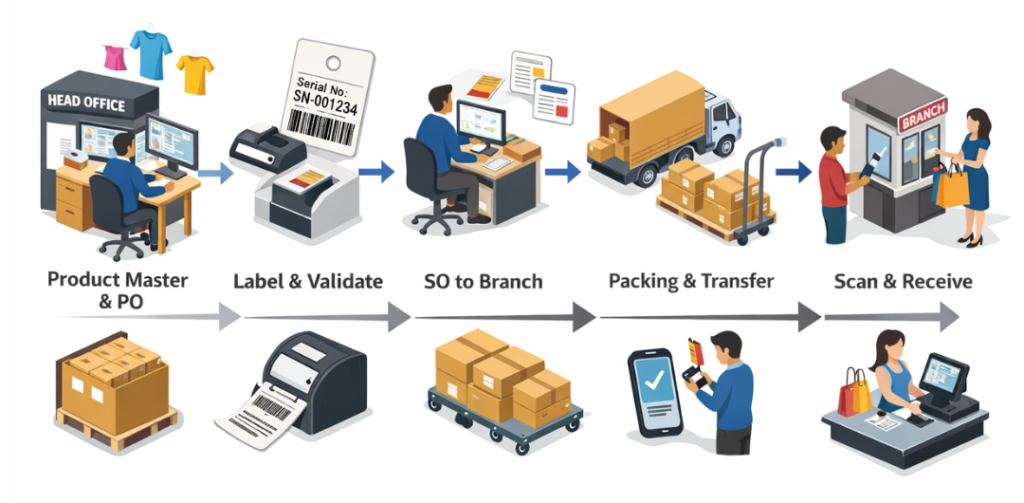
𝗔 𝘀𝘁𝗿𝘂𝗰𝘁𝘂𝗿𝗲𝗱 𝗢𝗱𝗼𝗼 𝗶𝗻𝘃𝗲𝗻𝘁𝗼𝗿𝘆 𝘄𝗼𝗿𝗸𝗳𝗹𝗼𝘄:
PO → Label & Validate → SO (to branches) → Package → Transfer → Scan Receive
If your retail franchise struggles with:
It’s time to implement a structured 𝗢𝗱𝗼𝗼 𝗙𝗿𝗮𝗻𝗰𝗵𝗶𝘀𝗲 𝗜𝗻𝘃𝗲𝗻𝘁𝗼𝗿𝘆 𝗠𝗮𝗻𝗮𝗴𝗲𝗺𝗲𝗻𝘁 𝗦𝘆𝘀𝘁𝗲𝗺.
It ensures:
As Odoo continues to evolve, version 18 is anticipated to introduce a range of innovative features designed to enhance user...
As Odoo continues to evolve, version 18 is anticipated to introduce a range of innovative features designed to enhance user...
As Odoo continues to evolve, version 18 is anticipated to introduce a range of innovative features designed to enhance user...
Let’s bring your vision to life! Get in touch with us today.
+91 871 483 1222